> For the complete documentation index, see [llms.txt](https://sync.objectbox.io/llms.txt). Markdown versions of documentation pages are available by appending `.md` to page URLs; this page is available as [Markdown](https://sync.objectbox.io/mesh-sync.md).
# Mesh Sync
How to use ObjectBox Mesh Sync to synchronize Sync clients directly with each other without a central Sync Server connection.
Mesh Sync lets ObjectBox Sync clients synchronize directly with nearby peers (peer-to-peer, P2P). It is intended for offline-first apps where devices may meet locally and exchange changes. Typically, Mesh Sync is complementing the regular Sync Server by providing local sync while no Internet is available.
{% hint style="info" %}
ObjectBox Mesh Sync is currently available for Android (Java/Kotlin and Flutter/Dart) and for Apple platforms (iOS and macOS; Swift and Flutter/Dart). More platforms will follow; let us know if you are interested. Please also note that the APIs are still subject to change until the final release. For a list of current limitations, see [Current Limitations](#current-limitations).
{% endhint %}
## Overview
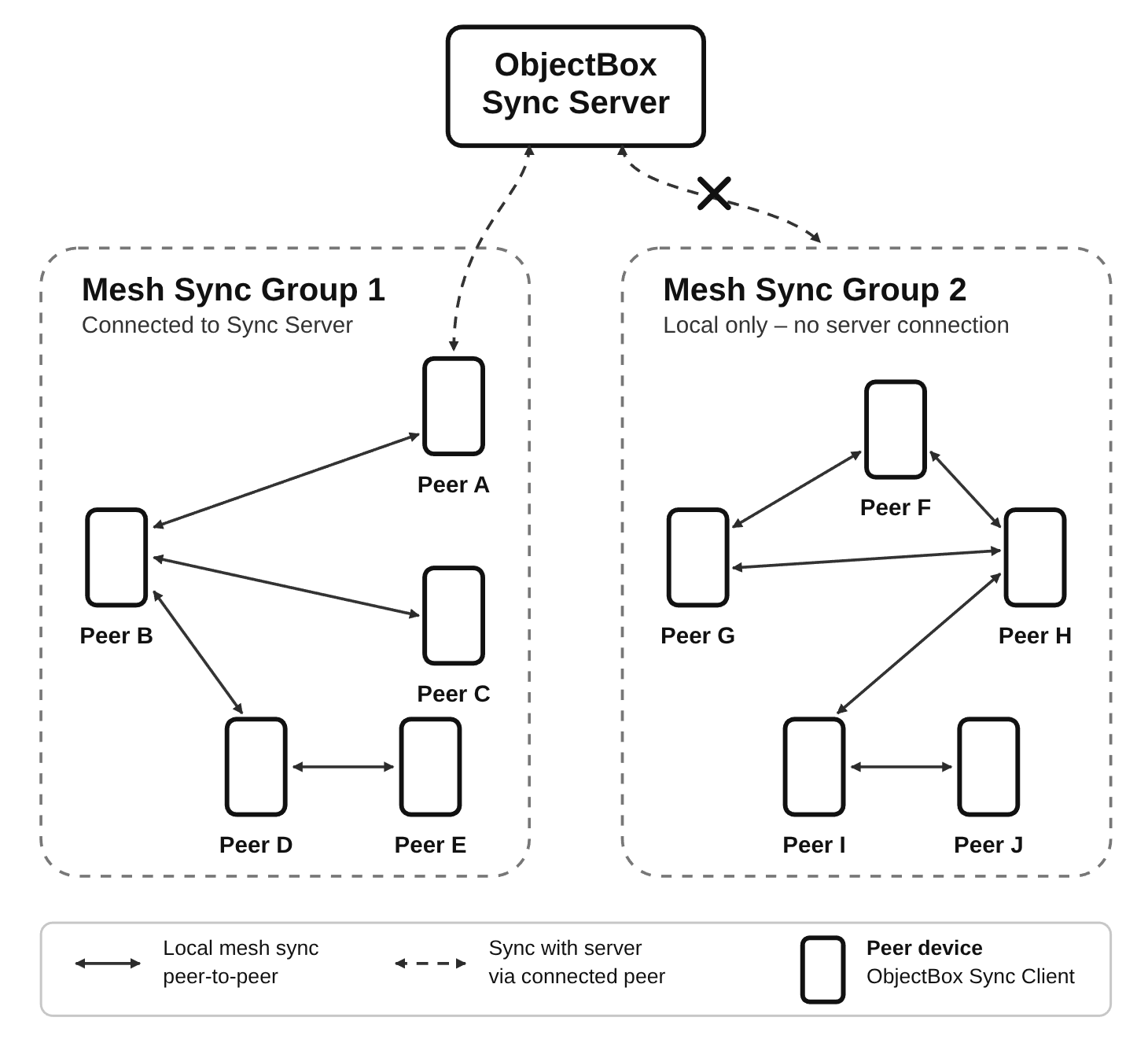
Figure 1: ObjectBox Mesh Sync Overview
Mesh Sync forms a local mesh network of devices to synchronize data between them. It can use different technology stacks, such as Bluetooth (classic and BLE), Wi-Fi (LAN and Wi-Fi Aware) and others. This allows data to move across devices even if not every device is directly connected to every other device.
Mesh Sync starts and stops together with the `SyncClient` and can coexist with regular Sync Server synchronization.
## Code: Initializing Mesh Sync
These minimal examples create the normal `SyncClient`, attach a mesh configuration and start syncing. Use the same mesh identifier on all apps/devices that should join the same mesh. The mesh ID should be unique to your application (for example, based on your application ID, like `com.example.myapp.mesh`).
{% hint style="info" %}
Mesh Sync can also be used completely without a Sync Server; the peers then only synchronize with each other. The `SyncClient` still requires a server URL, so pass a placeholder URL that does not connect anywhere, like `ws://127.0.0.1:1`. The client's connection attempts to it fail and are retried with a back-off in the background; this does not affect Mesh Sync.
{% endhint %}
{% tabs %}
{% tab title="Java" %}
```java
import io.objectbox.meshsync.android.AndroidMeshSync;
import io.objectbox.sync.MeshConfig;
import io.objectbox.sync.Sync;
import io.objectbox.sync.SyncClient;
import io.objectbox.sync.SyncCredentials;
MeshConfig meshConfig = AndroidMeshSync.createConfig(context, "com.example.myapp.mesh");
SyncClient syncClient = Sync.client(boxStore)
.url("ws://sync.example.com:9999")
.credentials(SyncCredentials.none())
.mesh(meshConfig)
.buildAndStart();
```
{% endtab %}
{% tab title="Kotlin" %}
```kotlin
import io.objectbox.meshsync.android.AndroidMeshSync
import io.objectbox.sync.MeshConfig
import io.objectbox.sync.Sync
import io.objectbox.sync.SyncClient
import io.objectbox.sync.SyncCredentials
val meshConfig: MeshConfig = AndroidMeshSync.createConfig(context, "com.example.myapp.mesh")
val syncClient: SyncClient = Sync.client(boxStore)
.url("ws://sync.example.com:9999")
.credentials(SyncCredentials.none())
.mesh(meshConfig)
.buildAndStart()
```
{% endtab %}
{% tab title="Swift" %}
```swift
import ObjectBox
import ObjectBoxMeshSync
let configuration = Sync.Configuration(store: store, url: "ws://sync.example.com:9999")
configuration.credentials = [SyncCredentials.makeNone()]
configuration.mesh = try AppleMeshSync.createConfig(meshId: "com.example.myapp.mesh")
let syncClient = try Sync.makeClient(configuration: configuration)
try syncClient.start()
```
{% endtab %}
{% tab title="Dart/Flutter" %}
The same code works on Android, iOS and macOS:
```dart
import 'package:objectbox/objectbox.dart';
import 'package:objectbox_sync_flutter_libs/objectbox_sync_flutter_libs.dart'
show createMeshConfig;
final mesh = await createMeshConfig('com.example.myapp.mesh');
final syncClient = SyncClient(
store,
['ws://sync.example.com:9999'],
[SyncCredentials.none()],
mesh: mesh,
);
syncClient.start();
```
{% endtab %}
{% tab title="C++" %}
```cpp
#include "objectbox-sync.hpp"
obx::MeshOptions meshOptions("com.example.myapp.mesh");
// Provided by a platform SDK or custom transport integration.
meshOptions.registerNetwork(networkSharedPtr);
std::shared_ptr syncClient = obx::Sync::client(store)
.url("ws://sync.example.com:9999")
.credentials(obx::SyncCredentials::none())
.mesh(std::move(meshOptions))
.build();
syncClient->start();
```
Note: The C and C++ APIs expose the underlying mesh options, but a platform transport must be registered before creating the Sync client. Do not use `obx_mesh_opt_network_internal()` directly unless your platform SDK or integration provides the required transport handle.
{% endtab %}
{% tab title="C" %}
```c
#include "objectbox-sync.h"
OBX_sync_options* sync_opt = obx_sync_opt(store);
obx_sync_opt_add_url(sync_opt, "ws://sync.example.com:9999");
OBX_mesh_options* mesh_opt = obx_mesh_opt("com.example.myapp.mesh");
// Provided by a platform SDK or custom transport integration.
obx_mesh_opt_network_internal(mesh_opt, network_shared_ptr);
// obx_sync_opt_mesh() consumes mesh_opt, including when an error occurs.
obx_sync_opt_mesh(sync_opt, mesh_opt);
OBX_sync* sync_client = obx_sync_create(sync_opt);
obx_sync_credentials(sync_client, OBXSyncCredentialsType_NONE, NULL, 0);
obx_sync_start(sync_client);
```
Note: The C and C++ APIs expose the underlying mesh options, but a platform transport must be registered before creating the Sync client. Do not use `obx_mesh_opt_network_internal()` directly unless your platform SDK or integration provides the required transport handle.
{% endtab %}
{% endtabs %}
## Setup
Keep the regular ObjectBox Sync plugin and setup from [Sync Client](/sync-client.md#objectbox-sync-enabled-library).
{% tabs %}
{% tab title="Android Kotlin DSL" %}
Use the Sync variant of ObjectBox version `6.0.0-beta` (or later), and add the Mesh Sync library for Android:
```kotlin
dependencies {
implementation("io.objectbox:objectbox-meshsync-android:6.0.0-beta")
}
```
This library provides the mesh network for Android. It also includes the required manifest permissions (see [Permissions](#permissions)) and its dependencies, so you do not need to add these yourself.
{% endtab %}
{% tab title="Android Groovy" %}
Use the Sync variant of ObjectBox version `6.0.0-beta` (or later), and add the Mesh Sync library for Android:
```groovy
dependencies {
implementation "io.objectbox:objectbox-meshsync-android:6.0.0-beta"
}
```
This library provides the mesh network for Android. It also includes the required manifest permissions (see [Permissions](#permissions)) and its dependencies, so you do not need to add these yourself.
{% endtab %}
{% tab title="Swift" %}
On Apple platforms, Mesh Sync is the `ObjectBoxMeshSync` library of the [ObjectBox Swift Package](https://github.com/objectbox/objectbox-swift-spm), available as a preview starting with version `6.0.0-beta.2`. It is only available via Swift Package Manager (not via CocoaPods). To keep its dependencies out of apps that do not use Mesh Sync, the library is behind the package's `MeshSync` trait, which requires Xcode 16.3 or newer.
In a `Package.swift`, enable the trait when adding the dependency and link the library next to the Sync library:
```swift
dependencies: [
.package(
url: "https://github.com/objectbox/objectbox-swift-spm.git",
exact: "6.0.0-beta.2",
traits: ["MeshSync"]
)
],
targets: [
.target(
name: "MyApp",
dependencies: [
.product(name: "ObjectBox-Sync.xcframework", package: "objectbox-swift-spm"),
.product(name: "ObjectBoxMeshSync", package: "objectbox-swift-spm")
]
)
]
```
In an Xcode project, Xcode 26.4 or newer offers a switch for the trait in the package dependency settings; with older Xcode versions, declare the dependency in a small local package as above and add that package to the project.
{% hint style="warning" %}
Swift 6.2 (Xcode 26.0 to 26.3) fails to resolve a version-based dependency that enables a trait with "exhausted attempts to resolve the dependencies graph". On these versions, pin the package by the commit of the version tag instead:
```swift
.package(
url: "https://github.com/objectbox/objectbox-swift-spm.git",
revision: "910840f73816ce78cbefef12d7869402675ae1bf", // 6.0.0-beta.2
traits: ["MeshSync"]
)
```
{% endhint %}
{% endtab %}
{% tab title="Dart/Flutter" %}
Use version `6.0.0-preview.3` (or later) of the ObjectBox Dart packages, which contain Mesh Sync support:
```yaml
dependencies:
objectbox: ^6.0.0-preview.3
objectbox_sync_flutter_libs: ^6.0.0-preview.3
```
On Android, the `objectbox_sync_flutter_libs` plugin already includes the Mesh Sync library for Android, with the required manifest permissions and dependencies.
On iOS and macOS, the plugin uses the `ObjectBoxMeshSync` library of the ObjectBox Swift Package (see the Swift tab). This requires the [Swift Package Manager integration](https://docs.flutter.dev/packages-and-plugins/swift-package-manager/for-app-developers) of Flutter (the default since Flutter 3.44) and Xcode 16.3 or newer. With the CocoaPods integration, Mesh Sync is not available and `createMeshConfig()` throws an `UnsupportedError`.
{% endtab %}
{% endtabs %}
## Permissions
Mesh Sync uses Bluetooth and Wi-Fi to discover and connect to nearby devices. On Android, this requires permissions declared in the manifest and granted at runtime (see below). On Apple platforms, it requires usage descriptions in the app's `Info.plist` and, for macOS, sandbox entitlements; see [Apple platforms](#apple-platforms-ios-and-macos).
### Android
Mesh Sync may use Bluetooth, Wi-Fi and location-related Android permissions for discovery and connections.
The Mesh Sync library for Android declares the permissions that may be required for its mesh network in its manifest. They are automatically merged into your app's manifest, so you do not need to declare them yourself. This applies to both Android (Java/Kotlin) apps and Flutter apps.
For reference, these are the permissions added by the library:
```xml
```
Note that not all of these permissions may be required. Depending on a device's Android version and your app's needs, only some of them may actually be necessary. For example, location permissions are typically not required on recent Android releases. To remove permissions your app does not need, use [merge rule markers](https://developer.android.com/build/manage-manifests) in your app's manifest:
```xml
```
### Runtime Permissions
Request all dangerous (runtime) permissions before starting Mesh Sync. On modern Android versions this typically includes nearby devices, Bluetooth scan/connect/advertise and location permissions. Location services may also need to be enabled on the device for discovery to work reliably.
If permissions are only granted after the sync client has started, call `retryNetworks()` on the running mesh, so it immediately retries starting its network radios. (Advertising is also retried automatically with an increasing delay, see `advertisingRetryMillis` in [Configuration](#configuration).)
{% tabs %}
{% tab title="Android (Kotlin/Java)" %}
The `MeshSyncPermissions` helper class requests any missing runtime permissions and notifies the mesh once they are granted:
```kotlin
class ExampleActivity : Activity() {
private val meshSyncPermissions = MeshSyncPermissions(this)
override fun onRequestPermissionsResult(
requestCode: Int,
permissions: Array,
grantResults: IntArray
) {
super.onRequestPermissionsResult(requestCode, permissions, grantResults)
meshSyncPermissions.notifyMeshIfPermissionsGranted(requestCode, syncClient.mesh)
}
fun onRequestPermissionsButtonClick() {
meshSyncPermissions.requestIfMissing()
}
}
```
If your app already [requests runtime permissions](https://developer.android.com/training/permissions/requesting) for other purposes, you can instead use `MeshSyncPermissions.runtimePermissions()` (or `missingRuntimePermissions()`) with your own permission logic, and call `MeshSync.retryNetworks()` once permissions are granted.
{% endtab %}
{% tab title="Dart/Flutter" %}
In Dart, `createMeshConfig()` requests the missing runtime permissions from the user via the system UI. It does not wait for the user's decision: the mesh network is created immediately. Pass an `onPermissionsGranted` callback to get notified once the user has granted (some of) the requested permissions; it should call `retryNetworks()` on the running mesh:
```dart
SyncClient? syncClient;
final mesh = await createMeshConfig(
'com.example.myapp.mesh',
onPermissionsGranted: () => syncClient?.mesh?.retryNetworks(),
);
syncClient = SyncClient(
store,
['ws://sync.example.com:9999'],
[SyncCredentials.none()],
mesh: mesh,
);
```
Alternatively, you can also implement your own permission request logic, and pass `false` to the `requestPermissions` parameter to prevent requesting runtime permissions. Note that `createMeshConfig()` will only request runtime permissions if they are not already granted.
On iOS and macOS, there are no runtime permissions to request, so `requestPermissions` and `onPermissionsGranted` have no effect there.
{% endtab %}
{% endtabs %}
### Apple platforms (iOS and macOS)
There are no runtime permissions to request upfront: the system asks the user for Local Network (and Bluetooth) access when Mesh Sync first uses them. Until the user accepts, discovery and advertising are silently suppressed; Mesh Sync keeps retrying to start its network radios (see `advertisingRetryMillis` in [Configuration](#configuration)).
Add these entries to the app's `Info.plist` (this applies to Swift and Flutter apps alike):
| Key | Value |
| ----------------------------------- | ------------------------------------------------------------------------------------------ |
| `NSLocalNetworkUsageDescription` | Why the app uses the local network (Mesh Sync discovers and connects to peers over Wi-Fi). |
| `NSBluetoothAlwaysUsageDescription` | Why the app uses Bluetooth (Mesh Sync also finds and connects to peers over Bluetooth). |
| `NSBonjourServices` | Required on iOS: the Bonjour service type derived from the mesh ID, see below. |
The Bonjour service type is `_._tcp`, where `` is the first 6 bytes of the SHA-256 hash of the mesh ID as upper-case hex. For example, the mesh ID `com.example.myapp.mesh` results in the service type `_C17B206CE9F6._tcp`. To compute it on a Mac: `printf %s com.example.myapp.mesh | shasum -a 256 | cut -c1-12`.
macOS apps are usually sandboxed and then need these entitlements in addition: `com.apple.security.network.client` and `com.apple.security.network.server` for Wi-Fi, and `com.apple.security.device.bluetooth` to use Bluetooth. (Sandboxed macOS apps using ObjectBox also need an app group, as documented for the ObjectBox Swift and Dart libraries.)
## Configuration
The mesh identifier controls which peers can discover each other. Peers with different identifiers ignore each other. Use different identifiers to isolate sync groups.
| Option | Default | Description |
| --------------------------------- | -------- | ------------------------------------------------------------------------------------------------------------------------------------ |
| `meshId` | Required | Mesh network identifier. |
| `maxConnectionCount` | `3` | Maximum number of simultaneous peer connections. |
| `backoffMillis` | `10000` | Delay before retrying a failed connection. |
| `evictionBackoffMillis` | `30000` | Delay between peer evictions when a full peer makes room for a newcomer. |
| `randomSeed` | `0` | Random seed; `0` uses the current time. |
| `requestTimeoutMillis` | `5000` | Timeout for requesting a missing sync log from a peer before trying another peer. |
| `advertisingDelayMillis` | `2000` | Delay before advertising starts after Mesh Sync starts. |
| `advertisingRetryMillis` | `5000` | Base delay before retrying advertising after it failed to start (e.g. due to missing permissions); retried with exponential backoff. |
| `advertisingRetryMaxMillis` | `60000` | Upper bound for the advertising retry backoff. |
| `connectDelayMillis` | `1000` | Minimum delay between outgoing connection attempts. |
| `initialDiscoveryDurationSeconds` | `30` | Duration of the first discovery phase; `0` means it does not stop by time. |
| `discoveryDurationSeconds` | `15` | Duration of later discovery phases; `0` means they do not stop by time. |
| `discoveryPauseSeconds` | `45` | Pause between discovery phases. |
| `discoveryPauseJitterSeconds` | `15` | Random positive or negative jitter applied to the discovery pause. |
| `txLogBatchSizeKb` | `100` | Soft payload size cap for batching sync logs into a single transfer. |
| `txLogBatchMaxCount` | `1000` | Maximum number of sync logs to batch into one transfer. |
| `txLogMaxAgeSeconds` | `28800` | Maximum age of sync logs kept in the local mesh storage (default: 8 hours). |
The default `maxConnectionCount` of `3` is a good starting point for most meshes. A value of `4` may improve fault tolerance, but it increases radio activity. Values above `4` are usually not recommended. A value of `1` creates pairs and is not a real mesh topology.
Set configuration options using the API for your language. Note that not every option is exposed by every language API yet; for example, the Java/Kotlin API currently does not expose `randomSeed` and `txLogMaxAgeSeconds`. The following examples show how to configure a mesh and set `maxConnectionCount` to `4`.
The Swift API additionally offers `nearbyMediums` to restrict the mediums used for advertising and discovery, for example `[.wifiLAN]` to avoid Bluetooth (and its permission prompt) when all devices share a network. By default, all supported mediums are used.
{% tabs %}
{% tab title="Java" %}
Configure optional settings using the chainable setters of `MeshConfig`:
```java
MeshConfig meshConfig = AndroidMeshSync.createConfig(context, "com.example.myapp.mesh")
.maxConnectionCount(4);
```
{% endtab %}
{% tab title="Kotlin" %}
Configure optional settings using the chainable setters of `MeshConfig`:
```kotlin
val meshConfig = AndroidMeshSync.createConfig(context, "com.example.myapp.mesh")
.maxConnectionCount(4)
```
{% endtab %}
{% tab title="Swift" %}
Configure optional settings using the properties of `MeshConfig`:
```swift
let meshConfig = try AppleMeshSync.createConfig(meshId: "com.example.myapp.mesh")
meshConfig.maxConnectionCount = 4
meshConfig.nearbyMediums = [.wifiLAN] // Apple-only: optional, restricts the mediums used
```
{% endtab %}
{% tab title="Dart/Flutter" %}
```dart
final mesh = await createMeshConfig(
'com.example.myapp.mesh',
maxConnectionCount: 4,
);
```
{% endtab %}
{% tab title="C++" %}
```cpp
obx::MeshOptions meshOptions("com.example.myapp.mesh");
meshOptions.maxConnectionCount(4);
```
{% endtab %}
{% tab title="C" %}
```c
OBX_mesh_options* mesh_opt = obx_mesh_opt("com.example.myapp.mesh");
obx_mesh_opt_max_connection_count(mesh_opt, 4);
```
{% endtab %}
{% endtabs %}
If several devices start at the same time, give discovery and connection setup a little time. Mesh Sync intentionally staggers advertising and outgoing connection attempts to reduce radio contention.
## Diagnostics
The running mesh can report its state and connected peer count. Important states are `Created`, `Discovering`, `FullyConnected`, `Stopped` and `Dead`. Useful counters include discovered peers, connected peers, failed connection attempts, sent and received messages, received sync logs and applied sync logs.
{% tabs %}
{% tab title="Java" %}
```java
MeshSync mesh = syncClient.getMesh();
if (mesh != null) {
System.out.println(mesh.getStateString());
System.out.println(mesh.getConnectedPeerCount());
System.out.println(mesh.getStats(MeshStats.TX_LOGS_APPLIED));
}
```
{% endtab %}
{% tab title="Kotlin" %}
```kotlin
val mesh: MeshSync? = syncClient.mesh
if (mesh != null) {
println(mesh.stateString)
println(mesh.connectedPeerCount)
println(mesh.getStats(MeshStats.TX_LOGS_APPLIED))
}
```
{% endtab %}
{% tab title="Swift" %}
```swift
if let mesh = syncClient.mesh {
print(mesh.stateString)
print(mesh.connectedPeerCount)
print(try mesh.statsValue(.txLogsApplied))
}
```
{% endtab %}
{% tab title="Dart/Flutter" %}
```dart
final mesh = syncClient.mesh;
if (mesh != null) {
print(mesh.stateString());
print(mesh.connectedPeerCount());
print(mesh.stats(MeshStats.txLogsApplied));
}
```
{% endtab %}
{% tab title="C++" %}
```cpp
obx::Mesh mesh = syncClient->mesh();
if (mesh.isAttached()) {
std::cout << mesh.stateString() << std::endl;
std::cout << mesh.connectedPeerCount() << std::endl;
std::cout << mesh.statsU64(OBXMeshStats_txLogsApplied) << std::endl;
}
```
{% endtab %}
{% tab title="C" %}
```c
OBX_mesh* mesh = obx_sync_mesh(sync_client);
if (mesh) {
printf("%s\n", obx_mesh_state_string(mesh));
printf("%zu\n", obx_mesh_connected_peer_count(mesh));
uint64_t applied = 0;
obx_mesh_stats_u64(mesh, OBXMeshStats_txLogsApplied, &applied);
printf("Applied sync logs: %llu\n", (unsigned long long) applied);
}
```
{% endtab %}
{% endtabs %}
## Current Limitations
Mesh Sync is currently in public preview. Until the final release, we'll finalize the API and plan to address the following limitations.
* Only available on Android and Apple platforms (iOS, macOS); Mesh Sync has a network abstraction layer that is currently only implemented for these.
* On Apple platforms, Mesh Sync is only available via Swift Package Manager (not via CocoaPods), see [Setup](#setup).
* Data expiration is time-based only: sync logs kept for the mesh expire after `txLogMaxAgeSeconds` (default: 8 hours); there is no size-based limit yet.
* TBD: Peer authentication; currently there's no auth between peers other than the mesh ID.
* TBD: the mesh ID (required at construction time) is the only mechanism to form sync groups.
## Related Pages
* [Sync Client](/sync-client.md)
* [Troubleshooting Sync](/troubleshooting-sync.md)